
 Membership
 Network
 Regional Sites & Affiliates


 Events
 Participate
 Resources

 Training
 Credentials
 Government


 Content Channels
 Tools
Tools


 Business Overview





Before it Breaks
Bridging the gap in digital workplace operations

A shift is about to begin. The building is open, access systems are working, and the asset register shows a tablet as available. In practice, the tablet is still charging in another room. The spare is locked away, and the person with the key has not arrived.
Digital workplace programs have improved booking, ticketing, identity and asset management.
Yet the movement of equipment between storage, users and support teams often remains informal.
Physical device management still often depends on a staffed desk, a key, a spreadsheet or a series of messages. For facility management and corporate real estate leaders, this is an operational issue.
 Recognizing a broken physical workflow
The gap between digital records and the actual state of devices becomes visible when physical handoffs repeatedly break down. The main warning signs are:
-
system records do not match the device’s actual location, condition or availability
-
device access depends on staff presence, physical keys or local workarounds
-
device returns, repairs or replacements follow different steps across shifts or sites
-
handoffs are recorded in emails, spreadsheets, paper logs or not recorded at all
-
devices wait between steps without a clear owner or next action
-
no reliable record shows who last handled the device or whether the handoff was completed
 These failures compound over time. Each unrecorded or incomplete exchange weakens the reliability of the next status update. Across shifts and sites, that leads to queues, repeat visits, device searches and inconsistent access to equipment.
The cost of broken physical device workflows
The impact of the disconnect between digital systems and physical device workflows can be considerable. The 7th Annual State of Enterprise Mobility Report, published by B2M Solutions in February 2026, covered 671 companies across the United States, the United Kingdom, France, Italy, Germany and Spain and represented more than 1.2 million mobile devices.
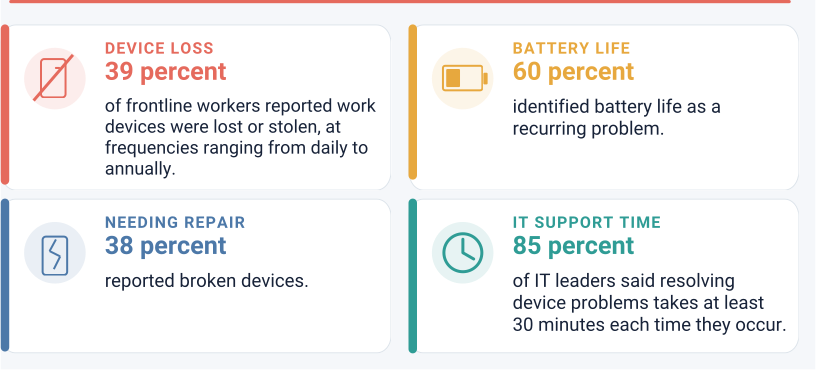
Respondents included frontline workers and information technology (IT) leaders across retail, transportation, manufacturing, warehousing, health care, field services, utilities and public safety. The survey found recurring problems with device condition, availability and control:
-
39 percent of frontline workers reported that work devices were lost or stolen, at frequencies ranging from daily to annually.
-
60 percent identified battery life as a recurring problem.
-
38 percent reported broken devices.
-
85 percent of IT leaders said resolving device problems takes at least 30 minutes each time they occur.
The study also found that mobile technology problems account for an estimated US$7.4 billion in annual wages paid while frontline workers are unable to work. Closing that gap requires the physical movement of devices to be planned with the same rigor as the digital systems that track them.
Building a reliable physical access layer
A reliable physical access layer treats each device’s movement as a controlled operational event. Building one starts with mapping the handoff, assigning responsibility, standardizing each step and linking the physical exchange to the relevant digital record.
Step 1: Identify the workflow that creates the most friction
Begin by selecting one device process for closer review. A useful starting point is a workflow that creates repeated delays, frequent staff intervention or visible disruption at busy times.
The workflow should be traced from the first request to the point when the device is ready for its next use. For a repair, that may include reporting the fault, dropping off the device, issuing a replacement, collecting the damaged unit and returning it to service.
A sample of recent transactions should then be reviewed. Ten to 20 cases are often enough to expose recurring gaps without turning the exercise into a large audit.
The review should record:
-
when the request was opened and when the handoff was completed
-
where the device moved and who handled it
-
whether/when staff switched to email, paper or verbal instructions
-
whether/when the mismatch between the IT system record and the actual state/location of the device appeared
-
whether/when/where the device waited without a clear owner or next action
-
which exceptions required a search, repeat visit, or manual correction
Service data alone rarely shows the full picture. FM, IT, operations and regular users should walk through the process together at the actual handoff location.
The output should be a simple workflow map. It should show each physical movement, the corresponding system update, the accountable role and the point where the formal process breaks down.
This creates a clear basis for standardization. It also prevents teams from redesigning the wrong process or investing in infrastructure before the real constraint is understood.
Step 2: Standardize the physical handoff
The selected workflow should be converted into a simple operating standard that can be followed across shifts and locations. Each handoff needs a defined starting condition, an accountable role and a confirmed end state.
The standard should specify:
-
how the user and device are identified before access is granted
-
where the exchange occurs and during which access hours
-
which checks confirm that the device is functional and ready
-
who records the transfer and releases the device for its next use
-
which team takes over when the transaction cannot be completed
A returned tablet should become “available” only after its asset tag is scanned, its condition is checked, and it is connected to power.
The handoff location should be assessed for demand, security, accessibility, power and connectivity. The process should also define time limits. A damaged return left without action for several hours is still an uncontrolled handoff.
Exceptions need named owners and fallback steps. A failed login, a missing charger, a full storage point or a network outage should trigger a documented response.
Step 3: Digitize the physical handoff
Record each physical handoff as a custody event and link it to the relevant system record to preserve the chain of custody.
Follow this process:
-
Define the custody-event record. Capture the user, asset, transaction type, time, location, device condition and next status.
-
Link the event to the correct record. Use a ticket number, asset identifier or workplace request identifier to attach the event to the system that owns the process.
-
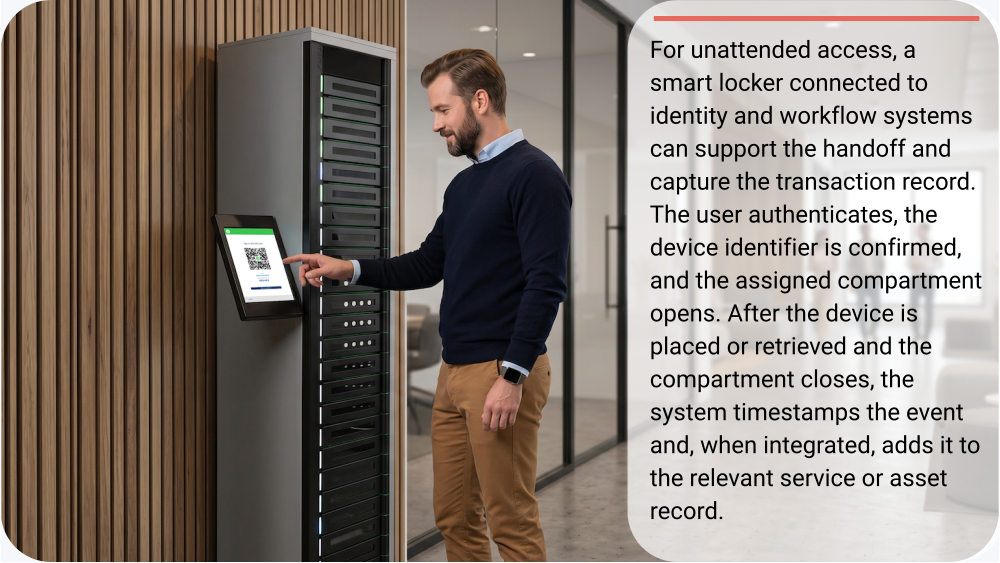
Configure the completion trigger. Define the action that confirms the handoff has occurred. This may be a staff member completing the transaction, a device identifier being scanned or a secure compartment closing after an authenticated pickup or return.
-
Verify the update. Compare returned fields with the intended change. If the platform returns only a success code, query the target record and confirm that the event or status appears.
-
Resolve failed updates. Create an exception record with the handoff identifier, failure reason and last successful step. Assign it for retry or manual correction and mark the digital sync as pending until the records match.
 Step 4: Pilot under real operating conditions
Test the new approach in one frequent workflow at one location before expanding it. Select a site with enough activity to expose delays, while keeping the process small enough to diagnose failures.
Record a baseline before launch. Use recent transactions to measure current handoff time, staff effort, failed exchanges and record mismatches.
Run the pilot through normal hours, a known peak period, after-hours access and at least one fallback scenario. Log the cause and recovery time for every delayed or incomplete transaction.
Track a focused set of measures:
-
median time from request approval to completed handoff
-
percentage of exchanges completed without FM, IT or operations staff performing the handoff
-
percentage of devices functional, charged, configured and complete at collection
-
exceptions caused by access, identity, storage or system failures
-
custody events that do not match the service or asset record
-
usage by time and location
Review the results weekly. Expand only when the workflow meets agreed targets and exceptions have clear, tested responses.
How FM, IT & operations should share responsibility
IFMA’s Facility Management Pulse Report, released in 2026, drew on more than 1,400 responses across 80 countries. It found that more facility professionals expect their overall workload to rise than fall, against a backdrop of modest budgets and constrained staffing.
That outlook leaves less capacity for informal tasks such as arranging device collections, locating missing equipment and correcting handoff records. A standardized, authenticated self-service process can reduce this manual work. These gains depend on a clear division of responsibility:
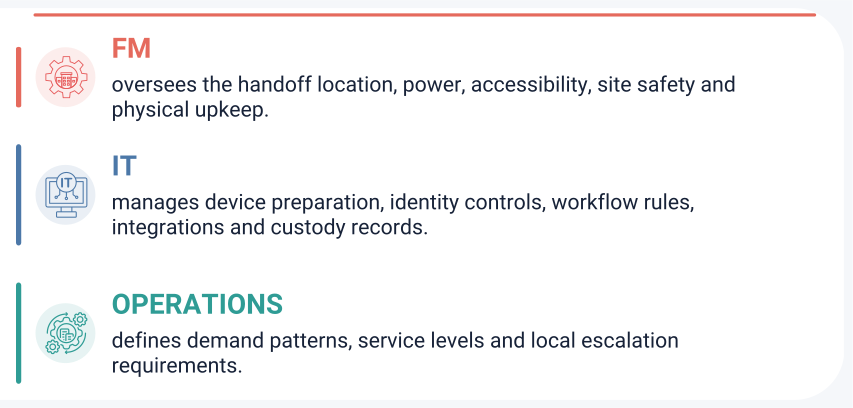
The three teams should review capacity and exceptions together. Where custody and location data remain current, remote monitoring can reduce device searches and staffed exchanges. Designated on-site teams can then focus on maintenance and physical exceptions.
Preparing for future workplace needs
Workplaces are becoming more distributed, data-driven and dependent on shared technology. Physical device access and device handoffs, therefore, need to be planned as part of the workplace infrastructure.
Each exchange should produce reliable evidence about demand, location, custody and readiness. To remain effective, the operating model should be tested for outages, adapted for new device types and applied consistently across sites.
The long-term goal is a workplace where digital records and physical operations move together. When that happens, FM can adapt access points, capacity and support models before small delays become recurring operational constraints.

Mary Atamaniuk is a content marketing manager at ForwardPass with a passion for writing and technology. She focuses on how practical technology solutions can simplify device management, reduce manual work and help organizations keep their devices ready for the people who rely on them.
References
Top image via Getty Images. Locker image via ForwardPass Smart Lockers.
Read more on Facility Operations and Facility Technology & Data Management or related topics Operational Technology , Information Technology and Facility Technology
Explore All FMJ Topics